Self-Service Contract Templates for Business Teams
Legal teams can hand off low-risk contracts without losing control.
Legal review is the most expensive bottleneck in most businesses, and it's not close. Self-service contract templates solve this by splitting the job in two: legal designs the rules once, and every other team executes inside them without waiting on a lawyer's calendar. That division of labor, and how well a company builds it, determines whether contracting scales with the business or quietly throttles it.
The math behind that bottleneck produces stark costs, driven by how in-house counsel time is priced and consumed per contract. Businesses lose an average of $122 for every hour in-house counsel spends on contract work, which turns legal review from a fixed cost of doing business into a resource that has to be rationed like any other scarce input. And the strain shows: 38% of in-house lawyers report experiencing burnout within the last 12 months. That's not a productivity problem so much as a structural one. A small, expensive function is being asked to personally sign off on an ever-growing volume of agreements that the rest of the business needs to move fast. Something has to give, and self-service is the mechanism that lets it give without breaking.
System architecture: templates, clause libraries, and locked fields
Every self-service system rests on two pieces of infrastructure: legal-drafted templates that cover the recurring deal types a business actually signs, and a centralized clause library holding the pre-approved language that populates them. The clause library shapes how quickly and reliably legal changes reach every contract that depends on it. It's a live source of truth, so when legal updates a liability cap or a data protection clause in response to a new regulation, that change cascades automatically across every template built on it. Nobody has to go hunting through a contract archive to find every place a stale clause got used.
Inside a template, three categories of content do different jobs. Locked terms, things like governing law, liability caps, and indemnification language, can't be touched by the person filling out the contract. Editable fields, counterparty name, deal value, effective dates, sit in a defined range a business user can safely fill in. And guided fields, usually structured as a short Q&A flow, walk the user through the parts of a contract they'd otherwise skip or fill in wrong.
Locking fields makes any of this safe. Without it, self-service is just handing a sales rep a Word document and hoping. With it, legal can hand execution to that same rep with confidence that no one is going to accidentally delete an indemnification clause while swapping in a client's name.
How approval routing turns templates into a governed workflow
Templates by themselves are static. A workflow only exists once conditional approval logic is layered on top, routing each contract based on the actual risk it carries rather than treating every agreement as equally dangerous.
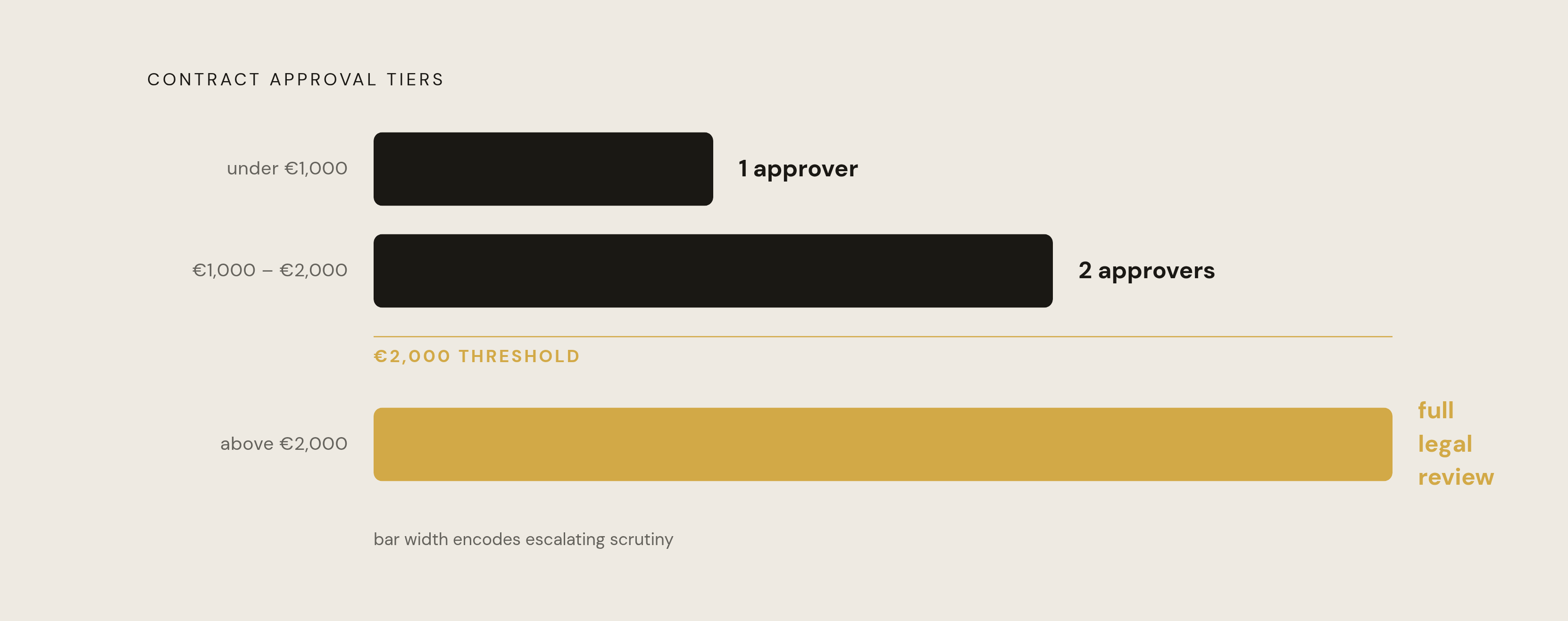
The mechanics are straightforward. Rules get configured by contract type, deal value, geography, and business unit, and those rules determine who has to sign off and how many approvers are required before a contract moves forward. One example from the research illustrates the pattern well: contracts under €1,000 need a single approver, contracts between €1,000 and €2,000 need two, and anything above €2,000 triggers full legal review.
That tiering is the whole point. It lets legal step back from the low-risk, high-volume agreements without abandoning oversight of the ones that actually carry exposure. The system escalates when the risk profile calls for it, and stays quiet the rest of the time. That's a meaningfully different posture than a legal team reviewing everything because it has no way to tell, in advance, which contracts are worth its time.
The performance gap between manual contracting and automated self-service
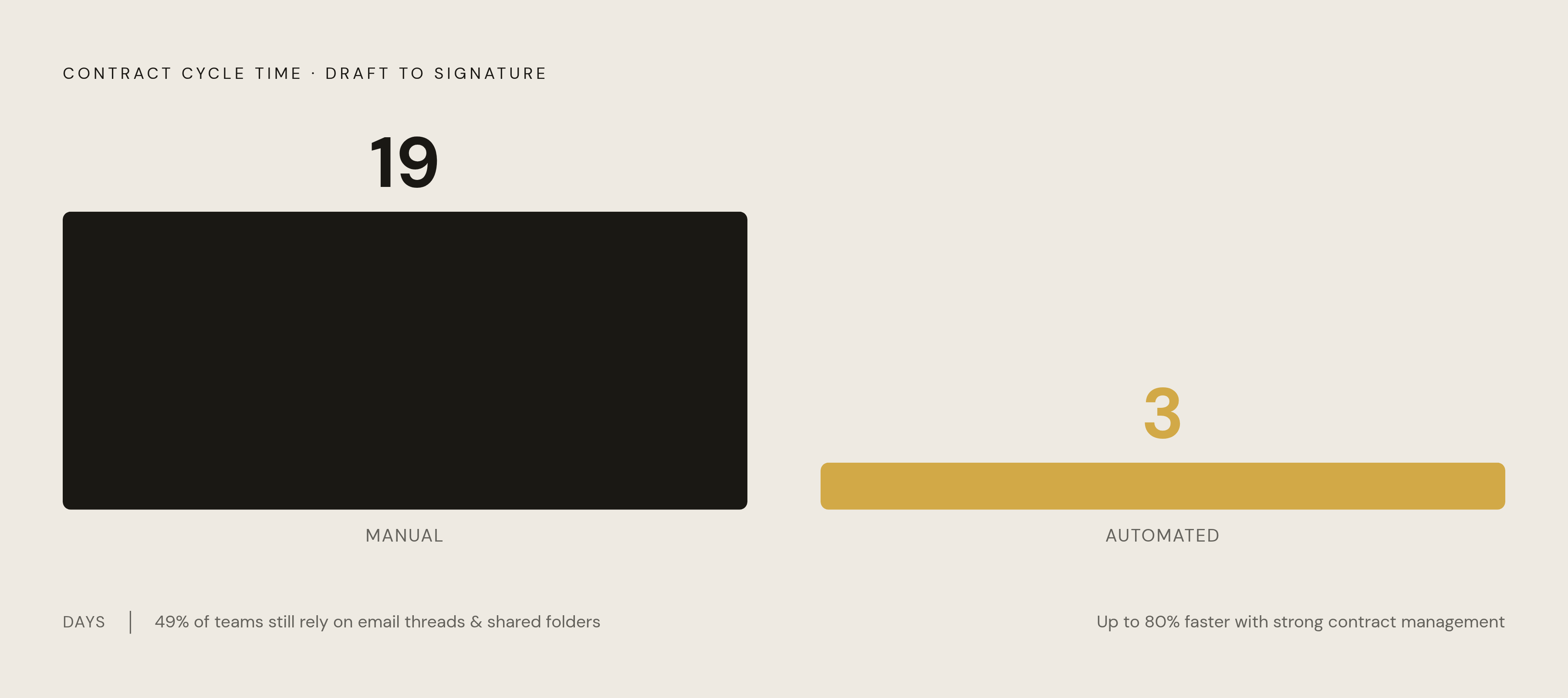
The numbers here aren't subtle. Manual contracting takes an average of 19 days from draft to signature. Automated self-service brings that down to 3 days. That's not a marginal efficiency gain; it's a different order of speed entirely, and it explains why the businesses that adopt these systems don't go back.
Yet 49% of teams are still running contracts through email threads and shared folders, showing that the gap has nothing to do with tool performance. It's about how much of the business has actually adopted them. Teams that do run self-service workflows report cutting contract cycle times significantly, and research from WorldCC, tracking over 600 organizations, found that companies with strong contract management capabilities process agreements up to 80% faster than those without.
Speed isn't the only thing on the table, either. WorldCC's research, cited via Lexology, found that poor contract management erodes an average of 8.6% of contract value across an enterprise. Slow contracting doesn't just cost time, it costs money that never appears on anyone's dashboard, because it is value that was quietly negotiated away, missed, or left unenforced.
Where self-service systems break down: the adoption problem
The failure mode that kills most self-service rollouts has nothing to do with bad templates or poorly designed approval logic. It's friction. When the system lives on a separate platform, requiring its own login and an unfamiliar interface, business teams route around it. A sales rep who needs a contract out the door in the next hour isn't going to open a fifth tab and learn a new tool to get there.
Once that routing-around starts, legal ends up back in the loop on every contract anyway, and the entire investment in templates and approval logic sits unused. This is measurable at scale: According to available data, a majority of teams have not yet implemented any contract management system at all, and even among organizations that have, getting business users (not legal) to actually adopt it is the harder metric to move.
Meeting people where they already work fixes it, not more training. It's meeting people where they already work. Contract requests, template selection, and approval notifications need to happen inside the CRM a sales team already lives in, or the collaboration platform another department already uses every day. A tool that asks users to change their behavior to accommodate it is a tool that gets ignored, regardless of how well it's built underneath.
Selecting a platform: what the evaluation criteria mean in practice
Four things matter when evaluating a platform specifically for self-service, as opposed to contract management in general. Contract creation speed covers how fast templates, AI drafting, and clause libraries let someone produce a usable draft. Approval workflow automation covers whether routing, parallel approvals, and conditional logic actually work the way they're configured. Self-service capability tests whether a business user can create and send a contract without pulling legal in. And end-to-end throughput measures how much of the process, from request to signature, runs without a human manually pushing it forward.
Of those four, usability decides whether the whole exercise was worth it. A platform legal adores but sales quietly avoids isn't a self-service solution, no matter how well-designed its clause library is.
AI is also no longer optional context here. Current data shows 52% of in-house counsel now use generative AI in their work, and review assisted by such tools is moving from pilot programs into standard workflow for high-volume, lower-risk agreements. Platforms that build AI into drafting, review, and routing are becoming the baseline, not the differentiator.
A few platform profiles illustrate the range of approaches on the market. PandaDoc suits sales teams that want proposal creation and contract execution in one flow, with Starter pricing at $19 per user per month billed annually, or $35 month-to-month. Concord uses a flat-rate model, $499 a month for five included users (roughly $6,000 a year), with additional seats at $49 per user per month, appealing to organizations that want pricing that doesn't scale unpredictably with headcount. Summize is an AI-powered CLM built specifically around adoption, integrating with Microsoft Word, Teams, Outlook, Gmail, Slack, Salesforce, HubSpot, Jira, and SharePoint, and it's now available inside Claude as well, so users manage contracts in tools they already have open.
Ironclad offers enterprise-grade workflow automation with a visual Workflow Designer built for complicated, multi-step approval chains, priced on custom quote. Juro is browser-native, with a self-serve editor, conditional logic templates, and an AI assistant, and it leans on implementation speed as its selling point, also custom-quoted. Bind drafts contracts from a natural-language description without requiring a template for standard contract types, and pairs that with playbook-based review, built-in redlining, e-signature, and auto-filing, starting at $90 per seat per month. DocuSign CLM builds agreement workflows around its established e-signature foundation with broad enterprise integrations including Salesforce, custom-quoted. Agiloft offers a highly configurable no-code workflow builder for organizations with genuinely complex governance needs, though that flexibility comes with real setup effort, also custom-quoted. SpotDraft focuses on legal ops automation with intake forms and a self-service request portal, custom-quoted as well.
No single platform wins on every dimension. The right choice depends on which of the four criteria matters most for a given organization's contract volume and risk tolerance, and how much internal setup effort a legal ops team is prepared to spend getting there.
Governing the system over time: keeping templates current and the system trusted
A template is a living asset, not something legal writes once and files away. It's a living asset, and like any living asset, it needs an owner, a review schedule, and a defined process for how updates happen and who signs off on them.
The clause library is what makes ongoing governance possible without turning into a full-time audit job. Because a single clause update cascades automatically across every template built on it, legal doesn't have to chase down every template individually every time a law changes or a policy shifts. That single point of update keeps a system current; without it, the system quietly drifts out of compliance while nobody notices.
Certain events should always trigger a template review: new regulations, expansion into a new jurisdiction, a product change that alters the commercial terms a contract needs to reflect, or lessons learned the hard way from a dispute. Ownership needs to be equally clear. Legal owns the content of the templates and the standards in the clause library. Operations or legal ops typically owns how the platform itself is configured. The leads of each business function are responsible for ensuring their teams actually adopt the system and use it correctly.
When all three of those roles are doing their part, self-service functions as infrastructure rather than a project, the kind nobody thinks about until it's missing.