Workflow Automation for NDA Turnaround in High-Volume Teams
Redesigning intake and triage eliminates NDA backlogs that hiring alone cannot fix.
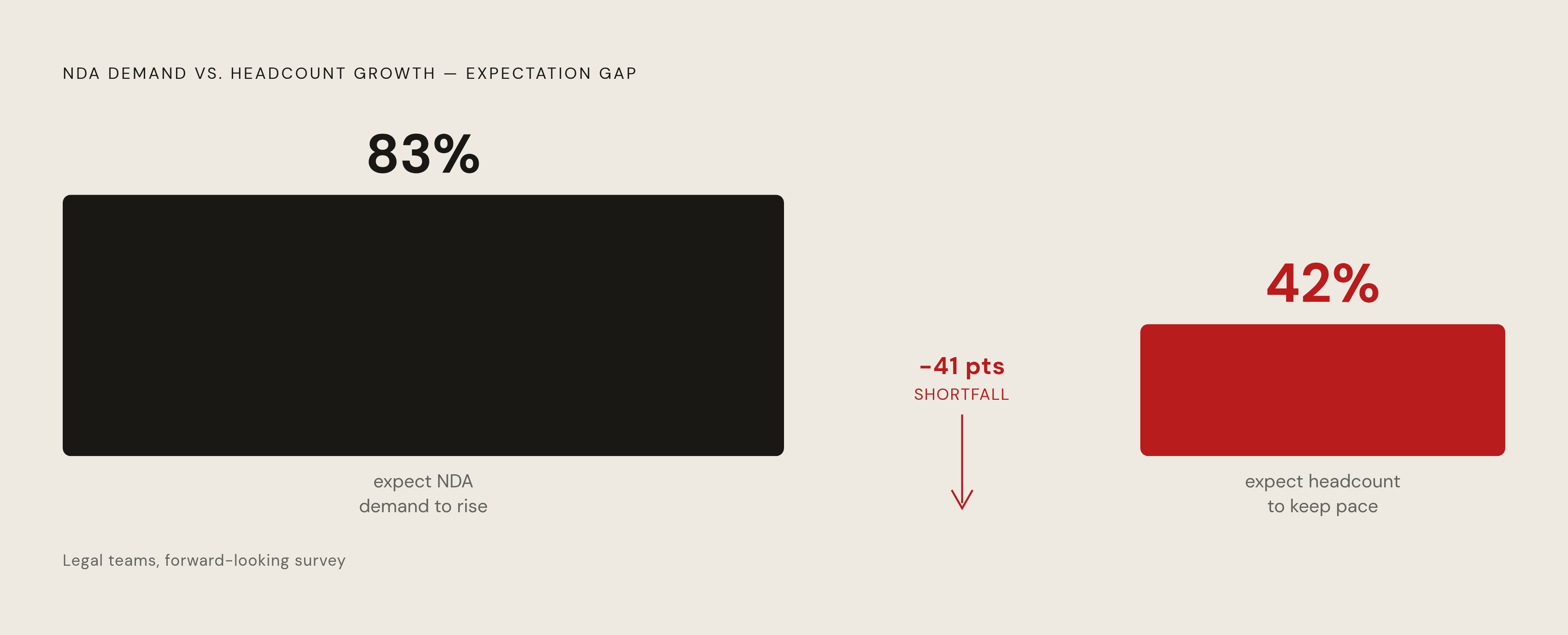
NDA backlog is a design failure, not a staffing shortage, and legal teams keep trying to hire their way out of a problem that hiring can't fix. Eighty-three percent of legal teams expect demand to keep climbing; only 42% expect headcount to grow with it. That gap is too wide for any reasonable req to close. The fix has to live inside the workflow itself, not in the next job posting.
Most teams are still absorbing that gap the hard way, one reviewer at a time. Only 30% currently use AI in their workflow, though 54% plan to adopt it within two years. Until then, turnaround time depends on who happens to be at their desk that day, not on how the system was built. That's a strange way to run something this repetitive, and it's the reason NDA queues back up even at companies with perfectly competent lawyers.
NDAs make this worse than most contract types because they're high-frequency and low-negotiation, yet they eat attorney time out of proportion to how legally complicated they actually are. In-house teams describe getting "deluged in requests for NDAs" even when the underlying agreement carries almost no real risk. Deal volume only adds pressure: PitchBook's Q1 breakdown reports 2,415 announced and estimated private equity transactions in Q1 2026, up 6.2% year over year, and virtually all of those deals require NDA execution before substantive conversations can begin. Deal volume adds pressure to NDA load regardless of how boilerplate the document usually is.
None of this means reviewers are slow. It means the workflow around them has no rails. Intake is ad hoc, triage is a judgment call made in someone's head, and approval chains live in email threads nobody can trace after the fact. Fix the rails, and turnaround stops depending on which lawyer happened to pick up the phone that afternoon.
What AI-assisted review does to NDA cycle time
AI reviews a standard NDA in 26 seconds. A human lawyer takes 92 minutes on the same document, a 212x gap, and the AI holds 94% accuracy doing it, close enough to attorney-level judgment that quality stops being the argument against it. But 26 seconds is a ceiling, not a guarantee: it's what the model can do to a document in isolation, and getting that speed to the counterparty depends entirely on what happens before and after the review step.
Most teams get the causality backwards. They assume dropping AI into the review step is the upgrade, when review was rarely the bottleneck that mattered most. Sirion's AI Contract Redline tool reports 60% faster contract review cycles against manual process, 40% faster negotiation cycles, and three times as many issues caught during redlining. Streamline AI cites a 60 to 80% reduction in routine NDA processing time. Those numbers reflect what becomes possible when the workflow around the AI is designed to support it. Bolt the same model onto a process where a lawyer still opens the document by hand, still routes it by email, still chases signatures manually, and the gain shrinks to a modest bump, nowhere near what the review-speed number promises on its own.
So a critical variable is not just which AI tool a team selects. It's whether intake, triage, and routing get redesigned around what the AI can do, instead of getting stapled onto the same broken sequence. Speed at the review layer is necessary. It's nowhere close to sufficient on its own, and any pitch that leads with the 26-second number without addressing what happens on either side of it is selling half the product.
Accuracy deserves equal billing, because a speed-only pitch tends to spook legal stakeholders who've heard "faster" promised before without "safer" attached to it. Sirion reports 99% on-time obligation compliance and an 80% drop in post-signature disputes, alongside that 3x increase in issues flagged during redlining. Those are quality outcomes, not throughput numbers, and they're the ones that actually get a general counsel to sign off on a rollout.
The four functional layers that a high-volume NDA workflow needs
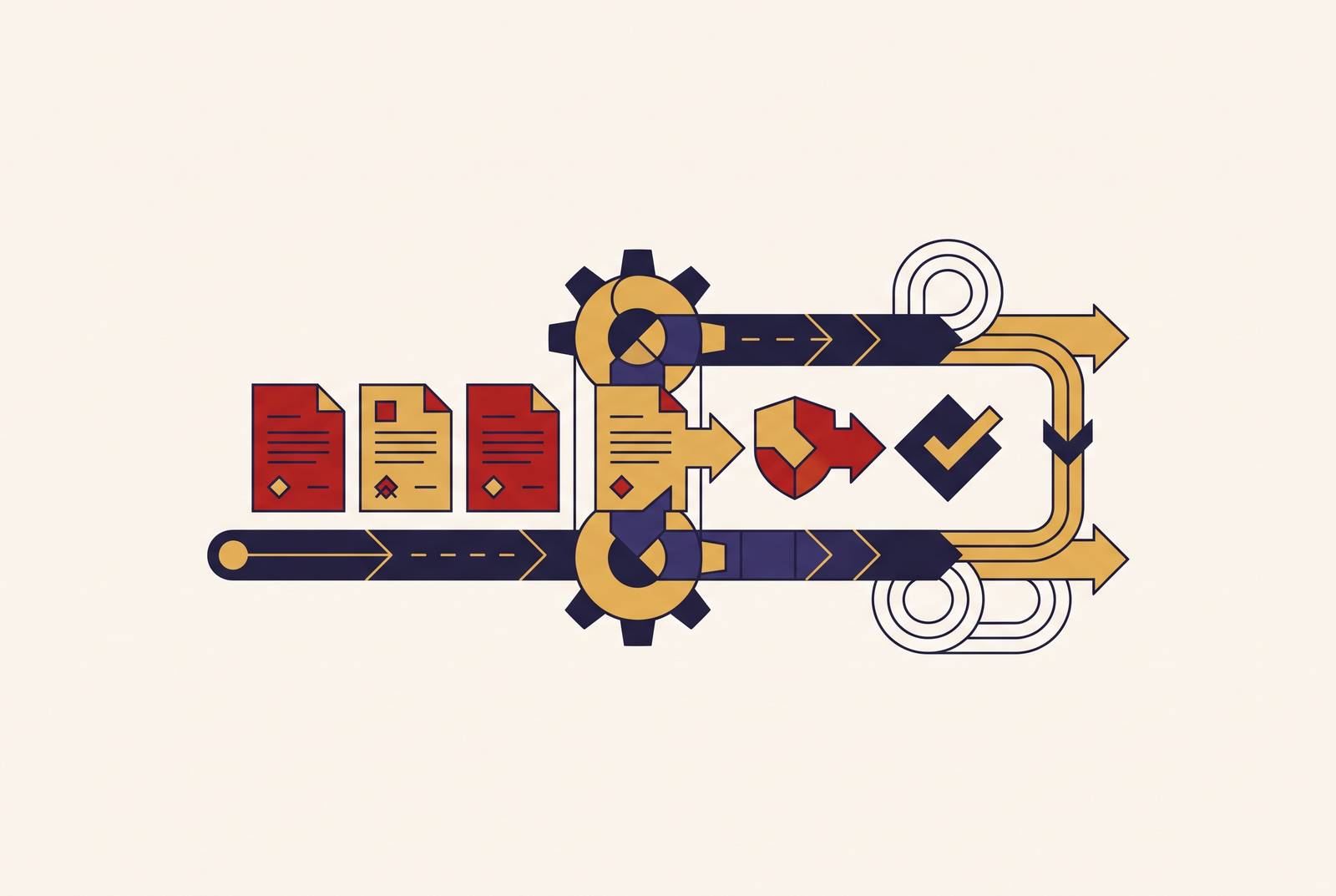
Legal automation generally breaks into four buckets: intake and triage, approvals, document routing, and task tracking. Applied to NDAs, that becomes four layers, and skipping any one of them undercuts the other three. Teams that buy a review tool and call it a workflow are the ones who end up disappointed six months later.
Intake comes first, and it has to replace the email inbox outright, not supplement it. A structured intake form captures counterparty name, deal type, urgency, and jurisdiction at the moment of submission, not three days later when a reviewer finally opens the thread. That form should sit in Slack, Teams, a web form, or a Salesforce trigger firing off a new deal record, wherever the business already works. The metadata captured right there drives every routing decision downstream. Triage has nothing to work with if intake is skipped, no matter how sophisticated the triage logic is.
Triage decides what needs a lawyer's eyes before a lawyer sees it. Rule-based or AI-driven logic checks risk level, whether the NDA is mutual or one-way, what kind of counterparty is on the other side, and how far the draft deviates from the standard template. Standard, low-risk requests route straight to self-serve generation. Anything with non-standard terms escalates to an attorney. Skipping this sorting step gives a routine vendor NDA the same scrutiny as a genuinely sensitive one, which is exactly the waste the whole system exists to eliminate.
Review and redline is where the AI does the clause-level work and humans make the calls that actually require judgment. The model flags unusual language, pulls a fallback position from the playbook, and produces a redline against the master template before an attorney ever opens the file. Attorneys then work from a document that's already been through a first pass, issues surfaced and a recommended position attached, rather than reading a blank NDA cold. Human oversight doesn't shrink here. It concentrates exactly where it belongs: at the points that call for judgment the AI hasn't been given authority to make.
The master template and playbook as the system's source of truth
The master template is a decision tree encoded into contract language. It's the legal team's current best thinking on what acceptable terms look like, written down once so it doesn't get reinvented in every reviewer's head. In an automated workflow, the template gets built before triage rules or approval chains get designed around it, because everything downstream inherits its quality. If the standard itself is fuzzy, no AI system can reliably tell a real deviation from a variation that's fine, and triage accuracy collapses no matter how good the model is.
The fallback playbook is what turns attorney judgment into something a machine can run at scale. For every clause type that tends to get negotiated, confidentiality scope, carve-outs, contract duration, return-of-information terms, the playbook spells out a position: accept as-is, accept with a specific modification, or escalate to a human. That mechanism is what lets AI handle redlines without pulling an attorney into every document. The judgment happens once, up front, when the playbook gets written. Skipping that step makes "AI-assisted review" mean the AI flags every deviation while a human still decides on every single one, which is barely an improvement over the status quo it replaced.
None of this is a one-time build, and treating it as one is the most common way teams sabotage their own rollout. Deal types shift, new counterparty categories appear, regulatory requirements change, and the template has to move with them. Teams that ship the playbook once and walk away watch their automation degrade quietly, month over month, as the AI keeps applying rules that no longer match how the business actually operates.
The payoff compounds once intake, triage, and the template are all dialed in: a large share of standard NDAs get generated and fully executed without an attorney touching them. The template does the legal thinking, the workflow routes the document automatically, and the attorney's time goes only to the exceptions that actually warrant it. That's the entire point of building any of this.
The platforms built for this job in 2026
Vendors here split into two categories, and confusing them is the fastest way to buy the wrong tool. One category automates the process: intake forms, routing logic, approval chains, status tracking. The other does the legal work inside that process: clause review, redlining, compliance checks. A team that only automates routing still has a full manual review sitting in the middle of the pipeline. A team that only speeds up review still has requests piling up in inboxes between every other step. Any vendor pitching just one side of that equation is selling half a fix, no matter how polished the demo looks.
Checkbox offers a no-code workflow builder for custom intake forms, triage logic, and approval flows, plus an AI Legal Front Door product built for intelligent intake and routing across Slack, Teams, Salesforce, and email. It suits teams handling a wide variety of request types at high volume. Ironclad is enterprise-focused: full contract lifecycle management with redlining, signature collection, and post-signature tracking, priced for teams that need all of it at once. ContractWorks is the more accessible option, a solid repository with basic automation built in, a reasonable starting point for smaller teams that don't want a heavy implementation project. Streamline AI builds workflow automation specifically for in-house legal, with intelligent intake and triage and real-time visibility across agreements, the source of the 60 to 80% processing-time reduction cited earlier. Josef is a no-code platform already running at companies including L'Oréal and Bupa for high-volume legal inquiries, with reported turnaround gains.
A few others cover narrower angles. Flank runs autonomous legal AI agents for contract review and routine workflow tasks. Harvey covers a broader swath of legal work, including document analysis and research, among other legal tasks. Lexion focuses on speeding up contract management across departments, including legal. Brightflag handles AI-powered legal spend visibility and enterprise legal management. BRYTER offers an AI productivity suite on a no-code platform, turning rule-based and AI logic into workflows legal teams build themselves. Evisort is an AI-native contract lifecycle platform.
LEGALFLY's Agent Studio deserves separate mention, because it targets a gap most of the list above doesn't touch: it lets legal teams build their own multi-step AI workflows, covering NDA approval chains, supplier onboarding, and compliance audit sequences, with legal sign-off built into each stage. Define the process once, and it runs the same way every time, at whatever scale the business needs.
Generic tools like Microsoft Power Automate, Filevine, or Notion can patch a gap here and there for light automation needs, but they lack the compliance features, audit trails, and legal-specific workflow logic that purpose-built platforms carry by default. They work fine as a stopgap. They are not a real answer for a team facing sustained, high-stakes volume, and treating them as one is how teams end up rebuilding the whole thing a year later on a platform built for the job.
Where teams typically stall during implementation
Intake design is where most implementations stall first, almost always because teams underestimate how much thought it takes to get right. Every field left vague on the form becomes a routing ambiguity downstream, and those ambiguities don't resolve themselves. They get kicked to a human to sort out manually, which defeats the purpose of building the form. The fix is to work backward: figure out what questions triage actually needs answered, then build the form around those questions specifically, not around whatever fields seemed reasonable at design time.
Template and playbook work takes longer than most teams budget for, because it's legal work, not configuration work. Somebody has to sit down and make the calls, clause by clause, that the playbook will later execute automatically without asking anyone. Teams that rush this step, or treat it as something to backfill later, end up with an AI that generates inconsistent redlines and escalates far more than it should. The whole project lands back at square one, usually with someone asking why the AI "doesn't work."
Then there's the leakage, and it's a real one, not a hypothetical. Many teams find that the business already routes around legal because of delays, meaning informal workarounds exist well before any automation project gets off the ground. Roll out a new NDA workflow while ignoring those existing channels, and it only gets adopted for the requests that go through official channels. The actual volume keeps leaking around it through whatever backdoor the business already built for itself, and no amount of triage logic fixes a workflow nobody is using. Addressing that leakage has to be part of the rollout plan from day one, not something to handle once adoption stalls.
Piloting on a single workflow before scaling is the practical answer to most of this. Get intake, triage, and the playbook right for one NDA type, watch how it performs against real volume, then extend the same architecture to other document types. Skipping that step and rolling out everything at once turns a promising automation project into one more abandoned tool nobody trusts, sitting next to the last three the team tried.